1. Bit.lify Co and share the URL via BlackBerry
Let face it: Some web address, or URL is too long to see them all - especially if you use equipment with celery small screen, like the BlackBerry for example. We try to paste the web address to a long email messages, the phenomenon occurs is the link to be broken and almost invisible when the area to be the recipient.
Bit.lify for BlackBerry
Bit.lify for BlackBerry
If you are using a computer desk set, then have a lot options so you can quickly and easily for the short URL, making them easily visible and easy to manage, the most popular of which is tinyurl.com. However the cellular sites via BlackBerry and services like TinyUrl not so simple, this is due to the page you need to navigate with the browser for the BlackBerry mobile computer can not favor written against the system workstation.
Bit.lify born to resolve the tasks set them. This software is created by Ubiquitous Systems, a company providing products twitter client SocialScope BlackBerry beta, bit.lify can shorten, share, and even check the URL easily with the click key BlackBerry Menu.
Before installation, you need to create an account to access bit.ly later to use the diary or personal reference. Once your account is activated and the application is installed, bit.lify will appear as an option BlackBerry Menu. To use the application, simply navigate to any page desired to "bit.lify", click the Menu on the right-left rotation of Balls of you - and select "bit.lify."
acreen shot of Bit.lify for BlackBerry Menu Options
Bit.lify Menu Options for BlackBerry

Then you will be prompted select delivery method URL - E-mail, PIN or SMS message - or you can choose to copy the address will be shortened. If you choose to send the URL method, a notification will be generated in the application of appropriate and new URL will be paste inside the body of the message.
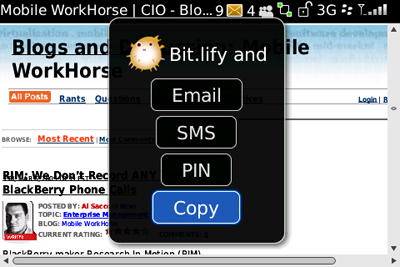
Bit.lify cho BlackBerry Menu Options

No comments:
Post a Comment