4/28/09

Pocket Stock Manager 5.8

Pocket Stock Manager 5.8 Pocket PC software

Pocket Stock Monitor transforms your Pocket PC into a mobile stock advisor.

Use Pocket Stock Monitor to track all the latest market activity.

While at work just insert the Pocket PC in its cradle and keep on top of all of the latest market movements. While on the go just connect with the internet to receive current exchange reports.

The program retrieves current data in predefined intervals. The stock rates are displayed in large font.

With the cradle a Pocket PC modem, ethernet card, or cableless WLAN connection can be used.

Features:

  • Easy to use interface
  • Five Views:
  • Index View: Stock rates for two exchanges with graph.
  • Detail View: Stock rate for one stock
  • Dual View: 2 stock rates
  • Quad View: 4 stock rates
  • List View: 12 stock rates simultaneously
  • Update interval adjustable
  • Cumulative stock rate chart
  • Portfolio Editor for grouping your stocks
  • Firewall and proxy support
  • Compatible: All Pocket PC 2000, Pocket PC 2002 and Pocket PC Phone Edition 2002 Devices

    Pocket Stock Monitor supports all large stock markets (America, Europe, Australia, and Asia).

    Essential Contax Pro PocketPC Magazine Nominee

    Pocket Stock Monitor was nominated the best software title for 2003 in the category "Information Management-Finance".

Wizcode Undelete Mobile 1.00

Wizcode Undelete Mobile 1.00 Pocket PC software

Wizcode Undelete Mobile is an inexpensive, easy-to-use but powerful file recovery and undelete software for Windows Mobile devices. Wizcode Undelete Mobile can undelete files on any storage cards visible by the mobile device host OS when files were:

  • Deleted without using recycle bin
  • Removed by virus attack, power failure or system crash
  • Removed when recycle bin has been emptied

Deleted files can be recovered with just a few clicks. To recover deleted files just select the storage card containing the deleted files, then choose the files you wish to recover.

Key features:

  • Recovers deleted files from storage cards.
  • Recovers the original filename and folder path.
  • Recursively rescans deleted folders and recovers contained files.
  • Recovers multiple files in one click.
  • Restores the original creation and modification dates.
  • Supports Unicode filenames.
  • Restores both short and long file names.
  • Supports FAT12, FAT16 and FAT32 file systems.
  • Visible representation of file/folder recoverability.

Files can only be restored if the disk areas allocated to the files have not been overwritten by new data and if the file chains were not fragmented. All recovered files should be validated for the integrity of the recovered data. It is recommended to keep your storage cards free from fragmentation in order for data recovery procedures to be successful.

4/27/09

Delta Minaret 3.1


Delta Minaret 3.1 Pocket PC software

Delta Minaret calculates daily prayer times, qibla direction and hijri date anywhere anytime. It acts like a mosque in your pocket. Wherever you go, prayer times are a simple click away. Delta Minaret is a must-have application for all Muslims. It is very simple to use and offers great flexibility in the calculations. You can access prayer times for nearly 1000 cities and you can even add your own city. You can hear a complete Adhan for every prayer. You can choose the calculation method for Asr either following Shafi or Hanafi school. You can also choose among the conventions used for twilight angles for the calculation of Fajr/Isha and you can add your own values. In addition, you don't have to worry about adjusting daylight saving since it's all done automatically. In short, Delta Minaret is a global prayer times calculator that presents you with accurate daily prayer schedules at the palm of your hand.

4/26/09

Pocket Atlas 2.0


Pocket Atlas 2.0 Pocket PC software

Note: Information is derived from the CIA World Factbook 2009

Description:

Pocket Atlas is a mini atlas that you can load into your pocket pc and carry it with you wherever you go. It allows you to have all the countries information, maps, flags and even time handy whenever you need them. Pocket Atlas shows for every country a map( you can zoom in and out and compute distances), the country name, capital, current time, geography (coordinates, location, bordering countries, coastline, time zone, area and climate), people(population, growth rate, religions, languages, literacy, ethnic groups, nationality, sex ratio), government(official country name, capital, administrative divisions, government types, national holidays), economy(imports ,exports, fiscal year, currency, currency code), communication(telephones, cell phones, international country code, country code, internet country code, internet users), transportation(ports and harbors, airports and heliports) and tourist attractions. Pocket Atlas also draws a day/night plot for the whole world, provides a comparison screen to compare different features for five countries simultaneously and also has a quick facts screen with some interesting facts about the world countries.
Updated following the CIA World Factbook for 2009

Rescue Bubbles Game


Rescue Bubbles Game Symbian software

Resco Bubbles is an action puzzle game where the idea is to clear the grid of bubbles in order to advance to the next level. You are given a sequence of bubbles, which should be quickly and efficiently popped. Numerous explosive, speed-up, slow-down and damage bubbles keep the game play exciting and challenging.
More features:
* Accelerometer support
* 60 challenging levels
* various surfaces
* calibration
* best score
* realistic ball-bounce feeling

How to play Resco Bubbles?
The gameplay is very simple! Control the steel ball by tilting the device and try to pop all the bubbles in the order from the lowest to the highest numbers. Try to do that as fast as possible and avoid all the dangerous bubbles. It's that simple — or is it?

4/25/09

SBSH Calendar Touch 2.1


SBSH Calendar Touch 2.1 Pocket PC software


The Next Generation of Time Management!

#1 Time Management Solution for Windows Mobile Devices


New Release - Introducing the ultimate time management system! Enjoy innovative and compelling tools to manage your daily agenda using advanced views, category coloring and icons far beyond the ability of the default Pocket PC tools.

Calendar Touch offers the best innovative tools to help you organize your daily agenda using your Windows Mobile Touch device. Easily control and track your busy agenda using Calendar Touch's set of professional calendar views; Search view; Filters; Attendees notifications and much more! All tools designed especially for use with the latest Windows Mobile Touch devices!


Gestures

  • Calendar Touch offers cool gesture-navigation features designed to make navigation easier and more enjoyable!
    • Swipe your finger horizontally will step backwards/forward for the current view date-span (e.g. next/prev day on the Daily view, next/prev month on the Monthly view)
    • Swipe your finger upwards will jump to today's date; downwards will bring the Touch-Date-Picker control to the screen
    • Swipe your finger horizontally without releasing your press from the screen brings the Touch-Date-Spinner, an animated date-picker that will continue to cycle until you release your finger from the screen. You can move forward/backwards in larger gaps faster and with a single finger swipe on the screen!

SBSH Calendar Touch For Windows Mobile Pocket PC: Gestures


Touch

  • Featuring touch-oriented design making it easy to control most Calendar Touch view features with your finger
  • Quickly navigate between different Calendar Touch views using the full screen touch buttons View Picker
  • Touch date and time pickers, easily input date and time values with a full screen large selection dialog and much more!

SBSH Calendar Touch For Windows Mobile Pocket PC: Touch


Powerful Calendar


  • Astonishing look & feel to all Views with a professional Touch styling
  • Automatically adopts current OS theme and colors, offering the best unified feel
  • Switch between all different views with a single finger touch! Easily jump between the Daily, List, Weekly, Monthly, Tasks and Search views

SBSH Calendar Touch For Windows Mobile Pocket PC: Full Calendaring Utilities


Tasks Management


  • Filter tasks view based on task status: all, overdue, active, completed, progress limited, undated and additional criterias
  • Greatly enhanced Tasks view to see more details than the default Tasks application offers
  • Sort tasks by due/start date, priority, completion and subject. Define two sub-sort levels for the Tasks view list.

SBSH Calendar Touch For Windows Mobile Pocket PC: Tasks Management


Search Utility


  • Search your agenda for specific appointment or task items using an innovative search tool
  • Define Calendar Touch to show between 5-100 most relevant results
  • Search within up to 2 years configured time frame! Get results in a time frame of one year ago until a year ahead

SBSH Calendar Touch For Windows Mobile Pocket PC: Search Utility


Innovation Inside


  • Designed to take advantage of all screen resolution devices
  • Especially designed Monthly view for landscape devices displaying the preview pane on the side
  • Innovative Pop out effect on Monthly and Weekly views for easier day tracking
  • Advanced Filtering system for personally configured task and appointment view
  • Calendar Touch supports all Windows Mobile screen resolutions available


SBSH Calendar Touch For Windows Mobile Pocket PC: Innovation Inside


Windows Mobile download


Steganos Privacy Suite Mobile 1.0


Steganos Privacy Suite Mobile 1.0 Pocket PC software

Mobile security suite for devices running Windows Mobile: Don't leave home without It!

Smartphones, PDAs and pocket PCs are shrinking in size but growing in versatility. But the smaller they get, the easier they are to loose. Anyone with access to your hardware has access to emails, documents, pictures, and more.

The risks:

  • 70% of mobile owners are not providing adequate protection to guard against data theft.* With unrestricted access to your information, the person that finds (or steals) your device can inflict serious financial and emotional damage.
  • E-mails contain and reveal a wealth of information, from the unimportant to the super secret — things you don't want other people reading.
  • It is estimated that in the US alone, over 10 million smartphones, PDAs and other portable devices will be stolen in 2009. And this number doesn't cover the number of devices that are simply lost.

The solution is Steganos Privacy Suite™ Mobile

  • Safe Mobile protects your data and e-mails — no access without a password.
  • Shredder Mobile destroys old and previously d data permanently. Cannot be retrieved with data recovery software.
  • Password Manager Mobile creates, encrypts and manages all your password and login information.
  • Bluetooth PhoneLock™ locks down smartphone access and adds another level of security to prevent data theft.

Better safe than sorry. True all-in-one security that protects what matters to you. Steganos Privacy Suite Mobile.


* Infowatch
** Ponemon-Institute

Features

Stick it in the safe. Lock the safe. Safe!
Encrypts and password protects all data on smartphones, PDAs, Pocket PCs, and memory cards.

Outlook Mobile Safe: e-mails in the bank.
Protects e-mails, contacts, and calendars for Outlook Mobile. No one can access sensitive data without a password.

Steganos Crypt & Go: fast, faster, fastest.
Allows password encrypt and decrypt operations on files and folders. Fast tracks access to information to save time.

Steganos Password Manager™ Mobile: easy-as-pie password management.
Locks down passwords, login data, bank info, and more in an encrypted list. Data is protected and at-the- ready, while user defined profiles and categories make sense of private and business passwords. Fully adapted to synchronize with PC versions.

Steganos Password Generator: need a password?
Creates highly secure passwords. User defined settings allow special characters and determine password strength level.

Bluetooth PhoneLock™: locks automatically
Utilizes any bluetooth device (e.g. a headset) as a smartphone key to guard against data theft and unauthorized access to e-mails, phone numbers and text messages. Once device is out of range, smartphone or PDA automatically locks down. Or open your data with a password if bluetooth key is low on power or just unavailable.

Steganos Shredder Mobile: all-in-one file and free space shredder
Destroys unwanted and hidden data fragments. Quick, permanent and unrecoverable data operations for smartphones and memory cards.

Steganos PicPass™: open sesame
Expresses long passwords strings as a series of images to access information on: data safes, Outlook Mobile safes, Password Manager and Crypt & Go.

Steganos PassCube™: another dimension to access control
Uses PicPass technology for graphic logins to smartphones and PDAs. Smart, simple and fast access using a series of pictures.

Quick start and Slider portal: easy and convenient
Allows seamless and browsable access to essential applications.

Touch screen support
Supports all Windows Mobile touch screen devices.

256 Bit AES
Uses an uncrackable 256 Bit AES (Advanced Encryption Standard) security algorithm.

4/23/09

tutLaunch v0.5


tutLaunch v0.5 Symbian software


tutLaunch allows you to store shortcuts and launch them without having the trouble of navigating to the program itself. It works similar like the Shortcut plugin on the Standby screen, except that the Standby Screen only allows you to have 6 shortcuts. For optimum use, you can assign one of the Standby screen keys to launch tutLaunch and so that you can easily access the shortcuts stored in tutLaunch.

Free Hash Tab

Free Hash Tab Symbian software

Free Hash Tab is a small hash on S60 v3 phones. It supports MD5, SHA-1 and CRC32.

4/22/09

T2 Remote Touch 1.2


T2 Remote Touch 1.2 Pocket PC software

Experience the fastest control of your Windows PC using your touch screen Windows Mobile phone.

+ Designed with touch screen in mind.
+ Control your PC from anywhere on the planet.
+ Scroll around the desktop with your thumb.
+ Zoom in and out instantly making this app very finger friendly.
+ Overview lets you jump anywhere on the screen.
+ Transfer files and clip board (copy/paste) between your PC and mobile while you control your PC.
+ Full screen keyboard give you finger tapping keyboard to directly type into your PC.
+ Profiles to multiple computers lets you easily switch between different computers.
+ Encrypted connection for safe file and remote control.


The uses for this application are endless:
+ Share files between your PC and phone.
+ Control your media center, music or video player.
+ View security camera from anywhere.
+ Troubleshoot problems from anywhere.
+ Faster browser than IE, Opera and Skyfire for Windows Mobile. (using WiFi)
Windows Mobile download

Pocket Atlas 2.0


Pocket Atlas 2.0 Pocket PC software

Note: Information is derived from the CIA World Factbook 2009

Description:

Pocket Atlas is a mini atlas that you can load into your pocket pc and carry it with you wherever you go. It allows you to have all the countries information, maps, flags and even time handy whenever you need them. Pocket Atlas shows for every country a map( you can zoom in and out and compute distances), the country name, capital, current time, geography (coordinates, location, bordering countries, coastline, time zone, area and climate), people(population, growth rate, religions, languages, literacy, ethnic groups, nationality, sex ratio), government(official country name, capital, administrative divisions, government types, national holidays), economy(imports ,exports, fiscal year, currency, currency code), communication(telephones, cell phones, international country code, country code, internet country code, internet users), transportation(ports and harbors, airports and heliports) and tourist attractions. Pocket Atlas also draws a day/night plot for the whole world, provides a comparison screen to compare different features for five countries simultaneously and also has a quick facts screen with some interesting facts about the world countries.
Updated following the CIA World Factbook for 2009

Features:

Pocket Atlas provides the following features:

1. Country Selection
  • You can select a country from the list provided on the main page which divides the countries by region or just gives you the whole list.
  • You can also click on any of the world map’s regions (Africa, Asia, Australia, Europe, Middle East, North America and South America) to get a more detailed map of the region and then tap on the country of your choice.

2. Country Map
Once you get the country map screen, you can scroll through it horizontally and vertically, zoom in and out and drag a line between any two points to compute the distance in both kilometers and miles.

3. Country Info
  • country flag
  • country capital
  • current tome
  • A menu of categories to choose from. The categories are (geography, people, economy, government, communication, transportation and tourism)
  • A set of features for each category. For geography (coordinates, location, bordering countries, coastline, time zone, area and climate), people(population, growth rate, religions, languages, literacy, ethnic groups, nationality, sex ratio), government(official country name, capital, administrative divisions, government types, national holidays), economy(imports ,exports, fiscal year, currency, currency code), communication(telephones, cell phones, international country code, country code, internet country code, internet users), transportation(ports and harbors, airports and heliports) and for tourism(tourist attractions).

4. Day/Night Plot with current time in three different countries of your choice

5. Compare different parameters for different countries. For example you can compare the population of any five countries of your choice.

6. Some quick world facts like the largest country in the world, the most visited…etc

7. A Help screen for each feature

4/21/09

Multercounter

MultiCounter Symbian software

Multiple Counter for Symbian S60 3rd edition. Press right to increase the current counter, or left to decrease the counter. Press up or down to go to the previous or next counter. You can add a new counter, or delete, and rename existing counters. You can also directly set the counter value. You can have unlimited counters with this application.
The data for the application are stored as text files in C:/data, which you can access using a file manager, or through the Desktop using Nokia PCSuite. Why is the data in a public directory? So you can import/backup your count to PC if you need it. The file count-data.txt contains the counter data (names of the counter and the count), the file count-names.txt contains only the names of the counter, and the file count-current.txt contains the current active counter.

OpenGPX


OpenGPX Symbian software

OpenGPX is an application for paperless Geocaching for S60 mobiles and optionally on Windows/Linux machines. It's written in Python and uses several additional modules (python-gtk for Win32/Linux and python for S60 for mobiles).
Features:
Simple usage: download GPX files from Geocaching.com and copy it on your S60 phone to the folder E:\Geocaching (you have to be a Geocaching premium member to access GPX files)
Browse through all Caches
Show cache text incl. coordinates, country/state, difficulty/terrain, distance and heading from home
Show all waypoints (including extracted waypoints from the cache description and from logs)
Add user defined waypoints (e.g. calculated waypoints)
View waypoints (this enables invoking of a navigation or mapping application to directly navigate to a specific waypoint)
Export waypoints to the location database of the phone
Show all logs for the cache
Show travelbugs (only names)
Show cache hint
Show spoiler images (images are resized and rotated automatically).
Built in calculator, Geocaching de/encoder, Caesar chiffre en/decoder, Convert text to numbers (A=1, ...)
Show the content of a specific file ('info.txt'), e.g. for some user defined notes
Simple GPS View (showing heading, distance to the target waypoint etc.)

4/20/09

eDrinksMixn Deluxe (Windows Mobile) 5.0


eDrinksMixn Deluxe (Windows Mobile) 5.0 Pocket PC software

Use eDrinksMix’n to store your favorite and most often used Drink recipes. With this application you can easily carry the recipes for your favorite cocktails and beverages everywhere you go from your bar at home, to a friend’s house, to a party or reunion, and all the way to the store.


Image 1


The application already contains an initial set of 80 very good recipes to get you started. Adding more drinks and edit them is a simple two steps process. You can add as many drinks as your device’s memory allows it, and categorize those drinks using categories that you define and make sense to you. The filtering features allows you to filter you drinks list by letter or by category, making it very easy to find the drink you need.


Navigating on the app is easy, just use your finger or stylus (depending on your device) to tap through the screens. Also, you can export your recipes to Text files and send them to your friends using your mobile device tools (email, text msg, beam, etc).


Image 1


The Deluxe version includes a PC companion, very similar to the software on the Mobile Device, to facilitate data entry on the PC. From PC companion the user can export the drinks recipes to a word file for printing or to excel as a CSV file. You can also sync your data between your PC and your Mobile Device.


Image 1


If you have Lakshmi Solutions LLC Shopping List in your device, you can rapidly add ingredients to your shopping list directly from the eDrinksMix’n application (only in English versions of Windows). Also look for Drinking Cooking and Shopping suite from Lakshmi Solutions LLC, which includes the eDrinksMix’n and more.

The application contains a Quick Guide describing each of the main features of the app.

Upvise Personal Edition

Upvise Personal Edition

Upvise Personal Edition Symbian software

From public sources of news or reference content like Wikipedia to your indispensable personal data, Upvise makes it easy to sync information between your mobile phone and your web account. and access on-the-go
Upvise Personal Edition include Free Mobile Personal Apps:
* Access Wikipedia on your mobile phone
* Read RSS News
* Mobile Contacts
* Notebooks
* Shopping Lists

4/15/09

Nokia Energy Profiler


Nokia Energy Profiler Symbian software


Use the Nokia Energy Profiler to test and monitor your application’s energy usage in real time in the target device. The application is a stand-alone test and measurement application for Nokia S60 3rd Edition, Feature Pack 1 devices (and onwards). If you are experiencing fast battery drains you can start monitoring your energy consumption and resolve the problem using the Nokia Energy Profile

4/14/09

Handy Shopper Assists Your Shopping Sprees


You love to shop but you have a bad memory? Handy Shopper is a simple and touch-friend


ly application for your Symbian S60 5th Edition Nokia 5800 phone. The app will help you remember to buy everything you meant to buy when you left home. It won’t help you manage that impulse of buying all that stuff that you really don’t need though.

4/13/09

Do You TextArt Your Friends Much?


SMS messages are very useful and they deliver important stuff instantly to your


friends and family no matter where they’re located. But would you like to improve your SMS mes

saging experience? Want to send good looking messages to all your friends?

Windows Marketplace Ready for Action?


Is Microsoft ready to launch its Windows Marketplace already? Apple’s App Store is the liv

Windows Marketplace Ready for Action?

ing proof that people want more and more content for their smarter cellphones. Google has launched its own version and RIM has an application store too. Even Acer wants one despite it’s not a big name in the cellphone business yet.

4/11/09

Iris Browser Beta For Windows Mobile


And so the browser wars continue on for another day, the Iris Browser just popped up in our catalog and for something still in beta, it's fairly useful.

MusicTones v1.0


Palm MusicTones v1.0 freeware


MusicTones supports mp3, wav, aac and amr file formats which could be imprted into the application and then be used for incoming call ringtone or new sms alert etc. You can cut and crop parts of the files and load them into the device memory. MusicTones is supported by Treo 600, 650, 680 and 700p.

4/10/09

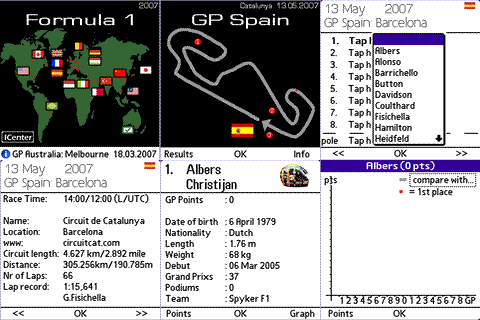
F1 Season 2007 by Deepweb All-Res v1.40

Palm F1 Season 2007 by Deepweb All-Res v1.40 freeware

F1 Season 2007 gives you detailed information about the F1 championship Season 2007.

This version contains all display resolutions, from 160x160 B&W up to full colour 320x320 graphics.

F1 Includes:

  • Circuits
    • Unique graphics
    • Circuit information
    • Results (here you can add the race results)
  • Drivers and Teams
    • Additional information
    • Driverslist
    • Teamlist
  • Championship (fast and simple)
    • Driver
    • Team
  • Statistics (numeric and GRAPHS)
    • Each Driver
    • Each Team
  • Info Center
    • Driver Championship
    • Team Championship
    • Tyre Championship
    • Fuel Overview
    • Calendar
    • Next Race
  • F1 in your Datebook
    • Add GP Events
    • Remove GP Events
    • Update GP Events
Update Description:
- Results: Grand Prix Spain 2007